
eVidyarthi
Menu
  • School
    • Close
    • CBSE English Medium
    • CBSE Hindi Medium
    • UP Board
    • Bihar Board
    • Maharashtra Board
    • MP Board
    • Close
  • English
    • Close
    • English Grammar for School
    • Basic English Grammar
    • Basic English Speaking
    • English Vocabulary
    • English Idioms & Phrases
    • Personality Enhancement
    • Interview Skills
    • Close
  • Sarkari Exam Preparation
    • Close
    • All Govt Exams Preparation
    • MCQs for Competitive Exams
    • Notes For Competitive Exams
    • NCERT Syllabus for Competitive Exam
    • Close
  • Study Abroad
    • Close
    • Study in Australia
    • Study in Canada
    • Study in UK
    • Study in Germany
    • Study in USA
    • Close
  • Current Affairs
    • Close
    • Current Affairs
    • Current Affairs Quizzes
    • State Wise Current Affairs
    • Monthly Current Affairs
    • Close
Science Class 9 Maharashtra Board | Menu
  • MCQ Science Class 9 Maharashtra Board
  • Book Science Class 9 Maharashtra Board
  • Question Answers Science Class 9 Maharashtra Board
  • Notes Science Class 9 Maharashtra Board
  • Important Questions Science Class 9 Maharashtra Board
  • Science Class 9

Science and Technology Class 9 Notes Chapter 10 Maharashtra Board

Information Communication Technology


Introduction 

What is ICT?

ICT stands for Information Communication Technology, which includes devices and services used to collect, share, process, and communicate information.

Importance:

  • The amount of information from science and technology is growing fast, and ICT helps manage this “information explosion.”
  • Without ICT, our knowledge can become outdated, so it keeps us updated with the latest data.

Devices Used in ICT:

  • Examples: Computers, telephones, smartphones, printers, scanners.
  • These devices help produce, store, classify, manage, and share information.

Evolution of Computers

Generations of Computers:

  • Computers have evolved through five generations since 1946.
  • First Generation (1946-1959): Used valves (e.g., ENIAC), were large, consumed lots of electricity, generated heat, and often shut down.

Modern Computers:

  • Today’s computers are fifth-generation, small, fast, and efficient due to advanced technology.
  • Use the internet to learn about all generations and their differences (e.g., size, speed, components).

Fields Using Computers:

  • Education, healthcare, banking, entertainment, weather forecasting, and research.

How a Computer Works

Main Components 
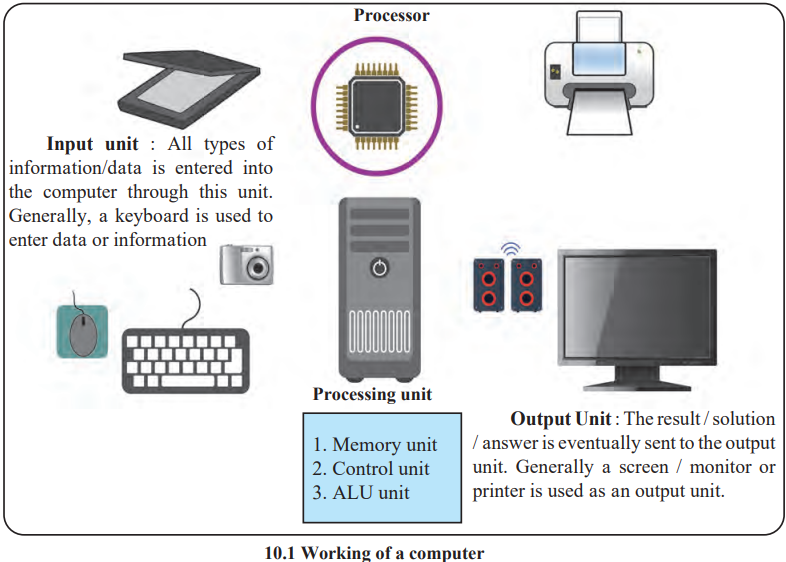
1. Input Unit:

  • Enters data or information (e.g., keyboard, mouse).

2. Processing Unit:

  • Includes:
    • Memory Unit: Stores data and results (RAM for temporary storage, ROM for permanent data).
    • Control Unit: Manages operations.
    • ALU (Arithmetic Logic Unit): Performs calculations.

3. Output Unit:

  • Displays or prints results (e.g., monitor, printer).

Memory Types:

Internal Memory:

  • RAM (Random Access Memory): Temporary storage, needs electricity to function, data is lost when power is off.
  • ROM (Read Only Memory): Permanent storage, data cannot be changed, used for basic instructions.

External Memory: Storage devices like hard disks or USB drives.

Operating System:

  • A program (e.g., DOS) that acts as a bridge between the computer and the user.
  • Essential for computer operation.

Data and Information:

  • Data: Raw, unprocessed facts (e.g., numbers).
  • Information: Processed data with meaning (e.g., a graph).

Hardware and Software:

  • Hardware: Physical parts (e.g., monitor, CPU).
  • Software: Programs and commands (e.g., Microsoft Word, operating systems).

Using Software

Microsoft Word:

  • Used to create documents.
  • Steps: Open, select “New” → “Blank Document,” type text, format with Home tab, insert equations via Insert → “Equation.”

Microsoft Excel:

  • Used to draw graphs from numerical data.
  • Steps: Open, select “New” → “Blank,” enter data, select data, choose graph from Insert tab, analyze results.
  • Precautions: Use tables, avoid spaces/special characters, start formulas with “=,” use “smart tag” for drag-fill.

Microsoft PowerPoint:

  • Used to create presentations.
  • Steps: Open, select “New” → “Blank Slide,” add text/pictures (Design/Insert tabs), animate (Animation tab), create slideshow.

Other Software:

  • Acrobat Reader: Views and prints PDF files.
  • Internet Explorer: A search engine to find information online.

Importance of ICT in Science and Technology

Uses:

  • Demonstration: Shows experiments (e.g., nervous system) using simulations/animations.
  • Prediction: Forecasts weather or trends by processing data.
  • Collecting Information: Uses internet, emails, blogs, video conferencing, Wikipedia.

Practical Application:

  • Students should use ICT (e.g., software, internet) while studying science, with help from teachers or parents.

Opportunities in the Field of Computers

Software Field:

  • Includes developing applications, software packages, operating systems, and scientific tools.
  • Companies create software, offering jobs in programming and design.

Hardware Field:

  • Involves designing, assembling, testing, maintaining, and repairing computers.
  • Companies in India make and service computers, providing many jobs.

Training:

  • Training new people for computer jobs requires skilled teachers.
  • A growing field with demand for dedicated educators.

Marketing:

  • Involves selling computers and accessories, needing skilled salespeople.
  • Requires knowledge of computers and marketing skills.

Institutes at Work

C-DAC (Centre for Development of Advanced Computing):

  • Located in Pune, established to research computer technology.
  • Developed India’s first supercomputer, “Param” (one billion calculations/second), used in space, medicine, meteorology, and more.
  • Led by Vijay Bhatkar, it also created the ISCII code for Indian language scripts.

Leave a Reply Cancel reply

Your email address will not be published. Required fields are marked *

Ads

HSC आणि SSC महाराष्ट्र – मराठी माध्यम – महाराष्ट्र बोर्ड

📘 महाराष्ट्र बोर्ड परीक्षा साहित्य (मराठी माध्यम)

  • HSC आणि SSC प्रश्नसंच – मराठी माध्यमातील PDF
  • महाराष्ट्र बोर्ड नमुना प्रश्नपत्रिका व मॉडेल पेपर्स (मराठी माध्यमात)
  • SSC आणि HSC च्या मागील वर्षांच्या प्रश्नपत्रिका – मराठी माध्यम
  • SSC/HSC साठी मराठी माध्यमातील नोट्स आणि सराव चाचण्या (मॉक टेस्ट)
  • मराठी माध्यमातील MCQs (बहुपर्यायी प्रश्न) समाविष्ट
  • सर्व परीक्षा साहित्य मराठी माध्यमात उपलब्ध

📗 महाराष्ट्र बोर्ड पाठ्यपुस्तके व PDF (मराठी माध्यम)

  • इयत्ता 10 वी (SSC) चे पाठ्यपुस्तक PDF – मराठी माध्यमात
  • इयत्ता 12 वी (HSC) चे पाठ्यपुस्तक PDF – मराठी माध्यमात
  • मराठी डायजेस्ट – PDF डाउनलोड
  • SSC आणि HSC इयत्तांची पुस्तके – मराठी माध्यमातील PDF
  • डाउनलोडसाठी उपलब्ध पाठ्यपुस्तके व PDF – महाराष्ट्र बोर्ड

📒 महाराष्ट्र बोर्डासाठी मराठी अभ्यास साहित्य

  • प्रकरणनिहाय नोट्स – मराठी माध्यमात
  • प्रकरणनिहाय प्रश्नोत्तरे (प्रश्न व उत्तरे) – मराठी माध्यमात
  • SSC आणि HSC साठी महत्त्वाचे प्रश्न – मराठी माध्यम
  • महत्त्वाच्या सूत्रांचा सारांश (इयत्ता 6 वी ते 12 वी)
  • MCQs, प्रश्नसंच, नमुना प्रश्नपत्रिका आणि मागील वर्षांच्या प्रश्नपत्रिका

CBSE Board Englsih and हिंदी माध्यम

CBSE Board

Mathematics Class 6
Science Class 6
Social Science Class 6
हिन्दी Class 6
सामाजिक विज्ञान कक्षा 6
विज्ञान कक्षा 6

Mathematics Class 7
Science Class 7
SST Class 7
सामाजिक विज्ञान कक्षा 7
हिन्दी Class 7

Mathematics Class 8
Science Class 8
Social Science Class 8
हिन्दी Class 8

Mathematics Class 9
Science Class 9
English Class 9

Mathematics Class 10
SST Class 10
English Class 10

Mathematics Class XI
Chemistry Class XI
Accountancy Class 11

Accountancy Class 12
Mathematics Class 12

Learn English
English Through हिन्दी
Job Interview Skills
English Grammar
हिंदी व्याकरण - Vyakaran
Microsoft Word
Adobe PhotoShop
Adobe Illustrator
Learn German
Learn French
IIT JEE

CBSE Board English Medium

  • Class 6 CBSE Board
  • Class 7 CBSE Board
  • Class 8 CBSE Board
  • Class 9 CBSE Board
  • Class 10 CBSE Board
  • Class 11 CBSE Board
  • Class 12 CBSE Board
  • CBSE Board Hindi Medium

  • Class 6 CBSE Board
  • Class 7 CBSE Board
  • Class 8 CBSE Board
  • Class 9 CBSE Board
  • Class 10 CBSE Board
  • Class 11 CBSE Board
  • Class 12 CBSE Board
  • बिहार बोर्ड
  • Class 6 Bihar Board
  • Class 7 Bihar Board
  • Class 8 Bihar Board
  • Class 9 Bihar Board
  • Class 10 Bihar Board
  • Class 11 Bihar Board
  • Class 12 Bihar Board
  • उत्तर प्रदेश बोर्ड
  • Class 6 UP Board
  • Class 7 UP Board
  • Class 8 UP Board
  • Class 9 UP Board
  • Class 10 UP Board
  • Class 11 UP Board
  • Class 12 UP Board
  • महाराष्ट्र बोर्ड
  • Class 6 Maharashtra Board
  • Class 7 Maharashtra Board
  • Class 8 Maharashtra Board
  • Class 9 Maharashtra Board
  • Class 10 Maharashtra Board
  • Class 11 Maharashtra Board
  • Class 12 Maharashtra Board
  • मध्य प्रदेश बोर्ड
  • Class 6 MP Board
  • Class 7 MP Board
  • Class 8 MP Board
  • Class 9 MP Board
  • Class 10 MP Board
  • Class 11 MP Board
  • Class 12 MP Board

ગુજરાત બોર્ડ

  • Class 6 Gujarat Board
  • Class 7 Gujarat Board
  • Class 8 Gujarat Board
  • Class 9 Gujarat Board
  • Class 10 Gujarat Board
  • Class 11 Gujarat Board
  • Class 12 Gujarat Board

PSC Exam Preparation

  • Uttar Pradesh PSC Exam Preparation (UPPSC)
  • Bihar PSC Exam Preparation (BPSC)
  • Madhya Pradesh PSC Exam Preparation (MPPSC)
  • Rajasthan PSC Exam Preparation (RPSC)
  • Maharashtra PSC Exam Preparation (MPSC)
Privacy Policies, Terms and Conditions, About Us, Contact Us
Copyright © 2026 eVidyarthi and its licensors. All Rights Reserved.